8 Best Wooden Monitor Stand of 2026: Stable Picks for Your Setup

Find a wooden monitor stand that actually stays stable under your monitor - from budget MDF to solid bamboo, with storage options.

Many wooden monitor stands look great on the surface but start sagging or wobbling once you put a real monitor on them. The issue is especially common with dual-screen setups and budget models that cut corners on internal support.

This guide separates the genuinely stable designs from the ones that rely on marketing numbers. It covers the trade-off between laminate MDF and solid bamboo, the importance of load capacity over aesthetics, and why a pre-assembled stand with a drawer might be worth the extra cost.

Whether you need a single riser for a 27-inch monitor or a long shelf for two screens, the right choice depends on understanding how weight, span, and material interact. Here are the stands that deliver on their promises.

1

Best Overall

Homerays Bamboo Stand

94 /100
Craft Score Outstanding

Key details

Height
5 inches
Assembly
Pre-assembled
Material
Solid Bamboo
Load Capacity
100 lbs
View on Amazon

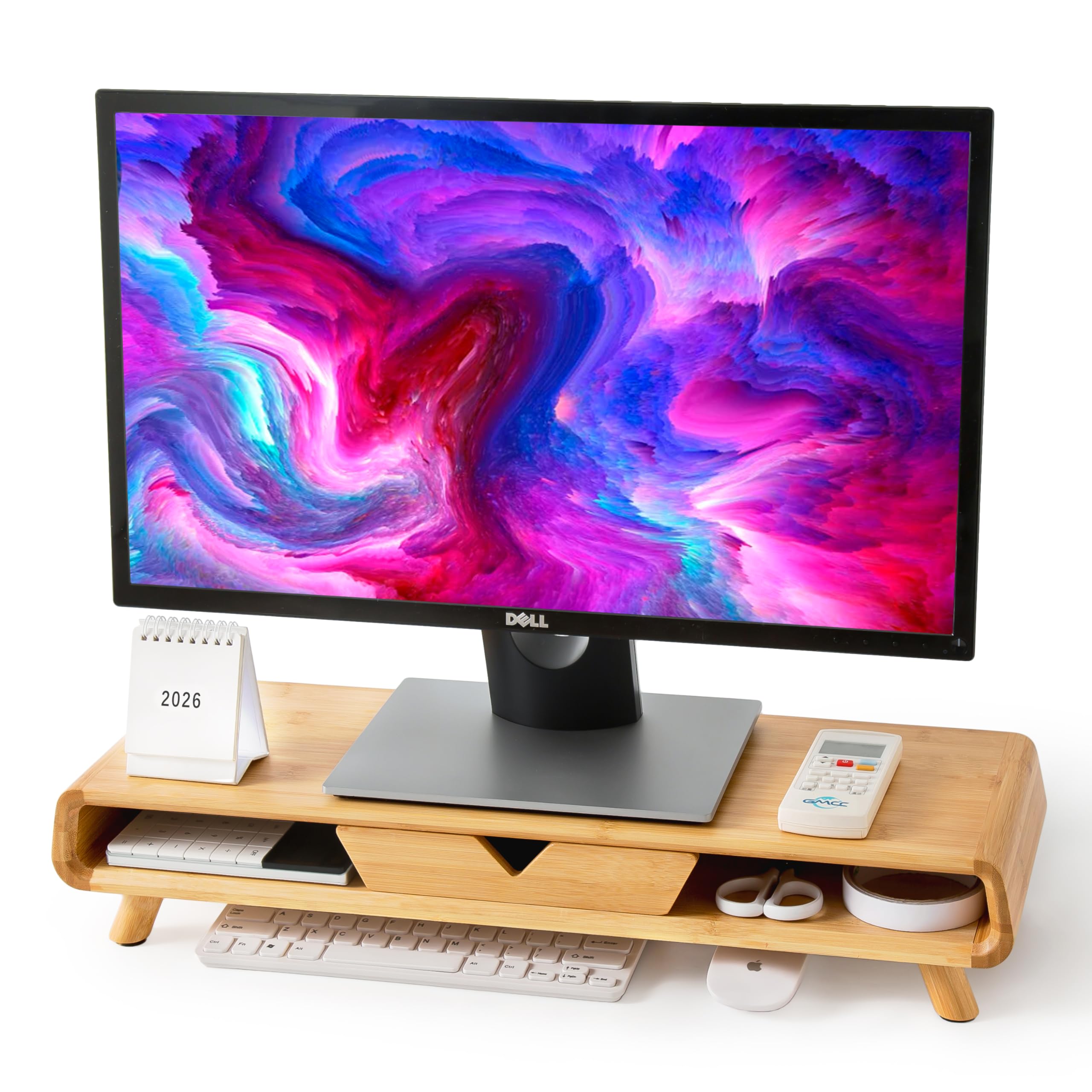
This bamboo monitor stand arrives in one piece – no screws, no instructions, just unwrap and set it on your desk. The solid bamboo construction feels dense and premium, with a smooth matte finish that resists scratches and staining. At 24.4 inches wide and 5 inches tall, it provides a stable 100-lb platform for a single monitor or laptop while raising the screen to a comfortable eye level.

The built-in drawer is wide enough for pens, small notebooks, or a phone, and the two rear cable management holes keep charging wires out of sight. One quirk: the drawer's smooth bamboo surface means it can slide out quickly if you pull too fast – a gentle hand avoids surprise drops. The cable routing is straightforward, though you'll want to leave slack for monitor tilt adjustments.

This stand suits professionals who value a natural wood aesthetic and refuse to spend time on assembly. It's ideal for single-monitor setups or laptop users who want clean desk organization. If you run two monitors side by side, you would need two units – the Homerays is sold individually. Ultra-budget buyers may prefer a cheaper MDF option, but the build quality here justifies the mid-range price.

Compared to budget laminate stands that feel hollow and show edge seams, the solid bamboo construction gives a more premium look and better longevity. A steel-reinforced budget alternative costs less but lacks the drawer and natural grain – for buyers who want both storage and aesthetics without assembly, this stand is the clear choice.

💡 Pull the drawer gently to prevent it from sliding out rapidly.

Pros

  • Natural bamboo finish adds a warm, organic look to any desk setup.
  • Fully assembled out of the box
  • Solid bamboo construction feels dense and resists scratches.
  • Drawer provides convenient storage for small desk items.
  • Supports up to 100 lbs, handling large monitors without sagging.

Cons

  • Drawer slides out quickly due to smooth bamboo finish
Our verdict

If you want a premium bamboo stand that's ready to use out of the box and won't sag under heavy monitors, this is the pick.

Check Latest Price
2

Best Budget Single Stand

TEAMIX 20" Wood Stand

92 /100
Craft Score Outstanding

Key details

Height
3.9 inches
Assembly
Required
Material
Engineered Wood (MDF)
Load Capacity
80 lbs
View on Amazon

A steel reinforcement bar inside the MDF frame gives this stand an 80-pound load capacity that competes with stands costing twice as much. Assembly takes under five minutes with the included screwdriver, and the legs slot firmly into place without wobble. Where the top pick arrives ready to use in solid bamboo, this model requires basic assembly and uses a laminate finish that won't fool anyone seeking real wood.

The 20x9.5-inch surface accommodates most single monitors up to 32 inches without sagging, and the 3.9-inch height lifts the screen into a neck-friendly position. The open shelf underneath offers space for a keyboard, notebook, or small printer when not in active use.

This stand fits buyers who prioritize function over finish – shoppers on a tight budget who need a stable, ergonomic riser and don't mind a visible seam or laminate wood grain. If the aesthetic matters more than the price, the top pick's solid bamboo justifies the extra cost.

💡 Place the stand away from strong direct overhead light – the seam becomes less noticeable in indirect or desk-lamp lighting.

Pros

  • Quick assembly with included tool
  • Steel reinforcement holds heavy monitors without sagging or wobble.
  • Solid performance at a low price
  • Effective 3.9-inch height reduces neck strain during long work sessions.

Cons

  • The two-piece top leaves a visible seam, and the laminate finish may look cheap under bright light.
Our verdict

For a single-monitor setup on a strict budget, this stand combines genuine strength and ergonomics with a finish that only matters if you demand natural wood.

Check Latest Price
3

Best Organized Dual Stand

Simple Houseware Dual

93 /100
Craft Score Outstanding

Key details

Height
5 inches
Assembly
Required
Material
Engineered Wood
Load Capacity
Not listed (dual)
View on Amazon

The Simple Houseware dual stand packs more organizational features than any competing stand at this price: a pull-out drawer, side caddies, a built-in phone slot, and removable dividers that let you customize the tray layout. The 33-inch width extends to 45 inches, giving you space to arrange peripherals exactly where you need them.

This stand suits users with light to medium monitors (under 20 lbs each) who want desk organization without sacrificing ergonomic height. The extra storage makes it ideal for small desks where every inch matters. However, if your monitors are heavier, the engineered wood construction may flex or bow — stability is best with lighter setups.

💡 Center a single heavy monitor or place lighter peripherals on the side caddies to reduce flex.

Pros

  • Adjustable dividers and side caddies let you tailor the layout to your gear.
  • Assembles in minutes with clear instructions and basic tools.
  • Frees up significant desk space by lifting monitors and storing items below.
  • Rustic brown finish adds a warm, intentional look to the workspace.

Cons

  • Under dual monitors exceeding 20 lbs each, the stand may flex or feel unstable
Our verdict

If you value integrated storage over raw load capacity, this stand delivers the most organization per inch of desk space — just keep monitors light.

Check Latest Price
4

Most Adjustable Dual Stand

FITUEYES Adjustable

93 /100
Craft Score Outstanding

Key details

Height
4 inches
Assembly
Required
Material
MDF (15mm)
Load Capacity
55 lbs
View on Amazon

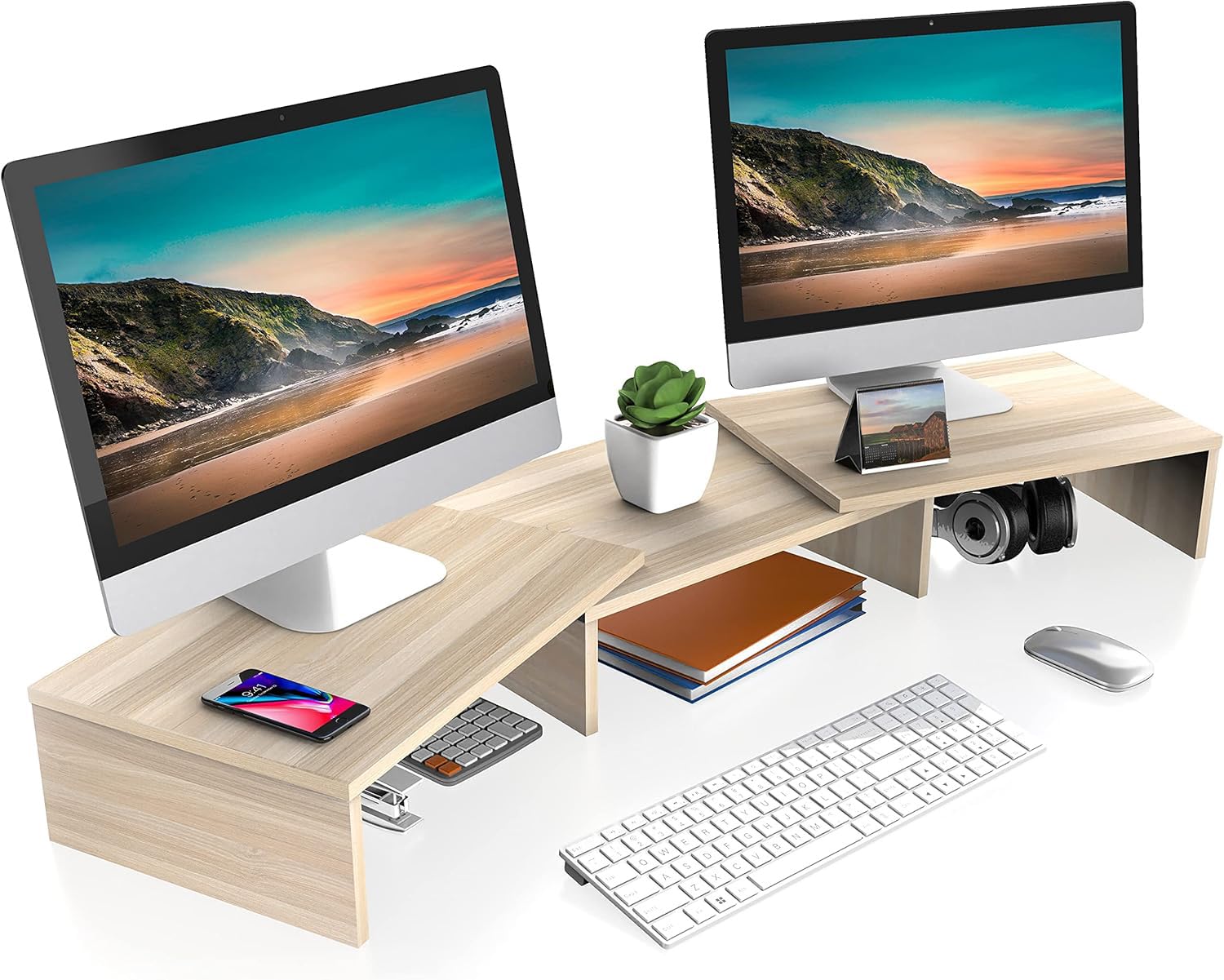
The FITUEYES stand is built around adjustability — its length and angle can be reconfigured to sit straight or at an angle, making it one of the few risers that actually fits into corner desks and L-shaped workstations. This flexibility is the main reason it stands out from fixed-width options.

Assembly is easy — attach the legs with the provided hardware in about five minutes. Once set up, the three shelves offer space for a phone, printer, or other gear, while raising dual monitors to a more comfortable viewing height. For those using laptops alongside a monitor, the extra shelf is a convenient spot for a tablet or notebook.

This stand is best for dual monitor users who need to adapt their desk layout, such as gamers and streamers working in compact corner setups. The MDF construction handles lighter monitors and laptops well, but it has limits — heavy professional monitors may push its stability. The tradeoff is worth it for those who prioritize configurable placement over maximum weight capacity.

💡 Keep each monitor under 25 lbs and distribute weight evenly to maintain stability.

Pros

  • Length and angle can be set straight or angled for corner desks
  • Five-minute assembly with basic tools
  • Raises screens to ergonomic eye level for dual monitors
  • Well-regarded by a large user base with strong satisfaction

Cons

  • Under two heavy monitors (over 25 lbs each), the stand may wobble or sag over time
Our verdict

If your desk has a corner or unusual shape and you're using moderate-weight monitors or laptops, the FITUEYES stand delivers the adjustability you need without a complicated setup.

Check Latest Price
6

Best Value Dual Pack

TEAMIX 2-Pack Stand

93 /100
Craft Score Outstanding

Key details

Height
3.4 or 6.8 in
Assembly
Required
Material
Engineered Wood (MDF)
Load Capacity
80 lbs per unit
View on Amazon

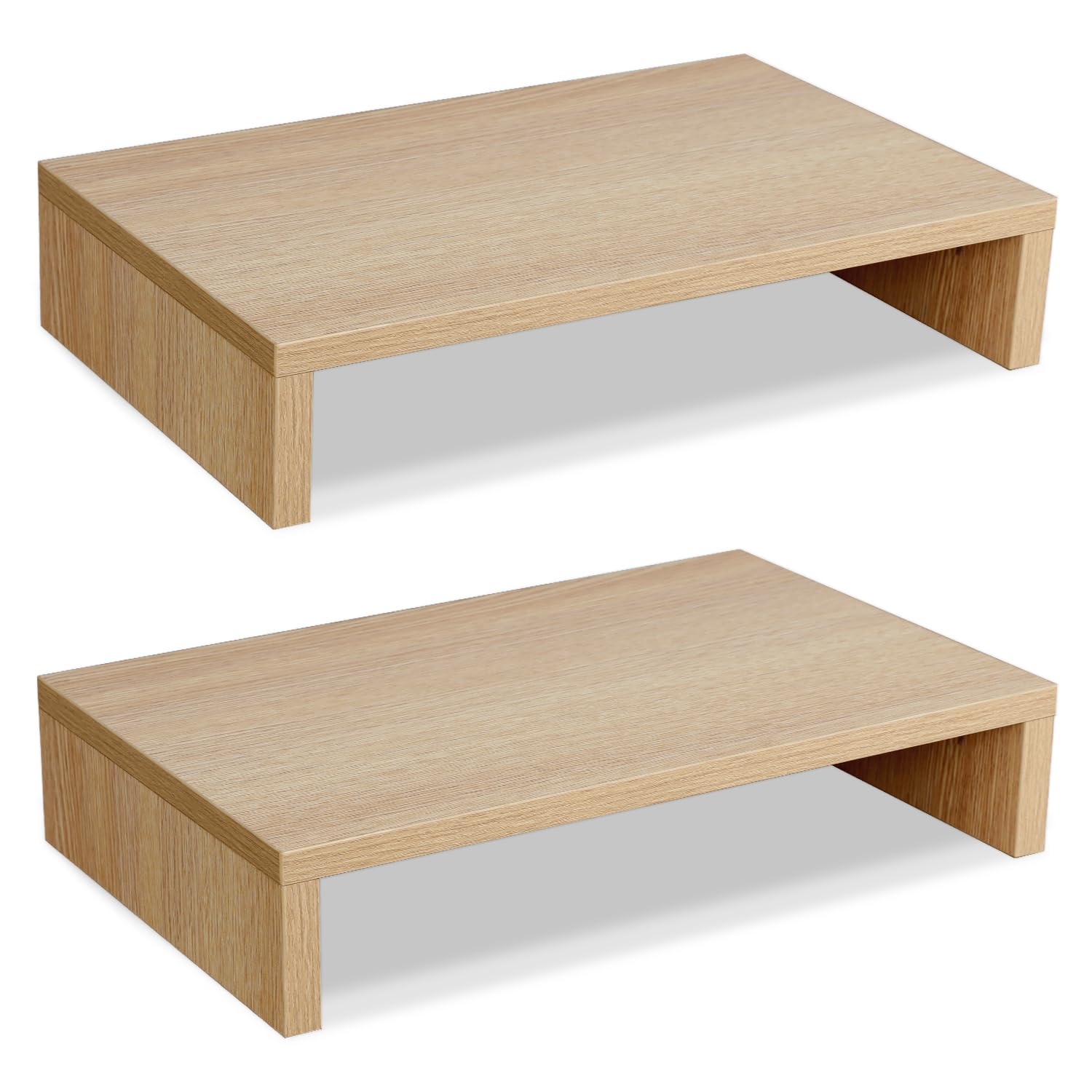
Two identical stands in one box let you place them side by side for a dual-monitor setup or stack them to raise a single screen to 6.8 inches.

This pack suits dual-monitor users who need height flexibility without spending much. The 14-inch depth works for most standard monitors but may fall short for wide bases over 14 inches — check your monitor dimensions before buying.

Assembly takes under five minutes with the included hardware, and each stand holds up to 80 pounds without sagging. The MDF construction feels solid for the price, though the laminated finish won't match solid wood.

💡 You can stack both stands to create a 6.8-inch riser for taller ergonomic needs.

Pros

  • Two stands can be placed side by side or stacked for double the height
  • Assembly takes minutes with included tools
  • Holds monitors securely for the price point
  • Cost-effective for a two-stand system

Cons

  • 14-inch depth may be too short for oversized monitor bases
  • Laminated particle board finish lacks the feel of real wood
Our verdict

A practical pick for dual-monitor setups that need height adjustability, as long as your monitors fit the 14-inch depth.

Check Latest Price
7

Dual Budget Pack

Simple Trending 2-Pack

93 /100
Craft Score Outstanding

Key details

Height
5.5 inches
Assembly
Required
Material
MDF top + metal
Load Capacity
50 lbs per unit
View on Amazon

This two-pack delivers solid wood-paneled stands at a budget-friendly price, with screw-on legs that take minutes to assemble. The antique brown finish fits most desk aesthetics, and each unit supports up to 50 lbs without wobble.

The tradeoff is the 9-inch depth, which can be too shallow for monitors with wide bases (over 9 inches require extra clearance). It suits typical laptops, slim monitors, or secondary screens, but users with bulky monitor stands should look at deeper options like the TEAMIX 2-pack.

Pros

  • Two stands for under $20, offering exceptional value for dual setups
  • Assembly is simple

Cons

  • 9-inch depth can be too shallow for monitors with wide bases
Our verdict

Best for budget-minded buyers with standard-width monitors or laptops who need two separate stands and don't require extra depth for bulky bases.

Check Latest Price
8

Adjustable Dual Budget

TAVR Dual Stand

92 /100
Craft Score Outstanding

Key details

Height
3.6 inches
Assembly
Required
Material
Wood (MDF) + metal
Load Capacity
44 lbs
View on Amazon

The TAVR stand’s adjustable length and angle make it a flexible fit for corner desks or unusual layouts, and assembly takes just a couple of minutes. The MDF construction can sag in the middle when supporting two monitors, especially if each exceeds 20 pounds. This stand works best for lightweight monitors where adjustability matters more than rock-solid rigidity.

Pros

  • Adjustable length and angle for custom desk fit.
  • Quick assembly in under two minutes.

Cons

  • May sag under the weight of two monitors, especially near the 20-lb-per-side limit.
Our verdict

Best suited for lightweight monitors (under 20 lbs each) on a desk where you need to adjust the layout occasionally.

Check Latest Price
9

Budget Height Adjustable

OPNICE Adjustable

90 /100
Craft Score Outstanding

Key details

Height
Up to 6.1 in
Assembly
Required
Material
Wood top + metal
Load Capacity
44 lbs
View on Amazon

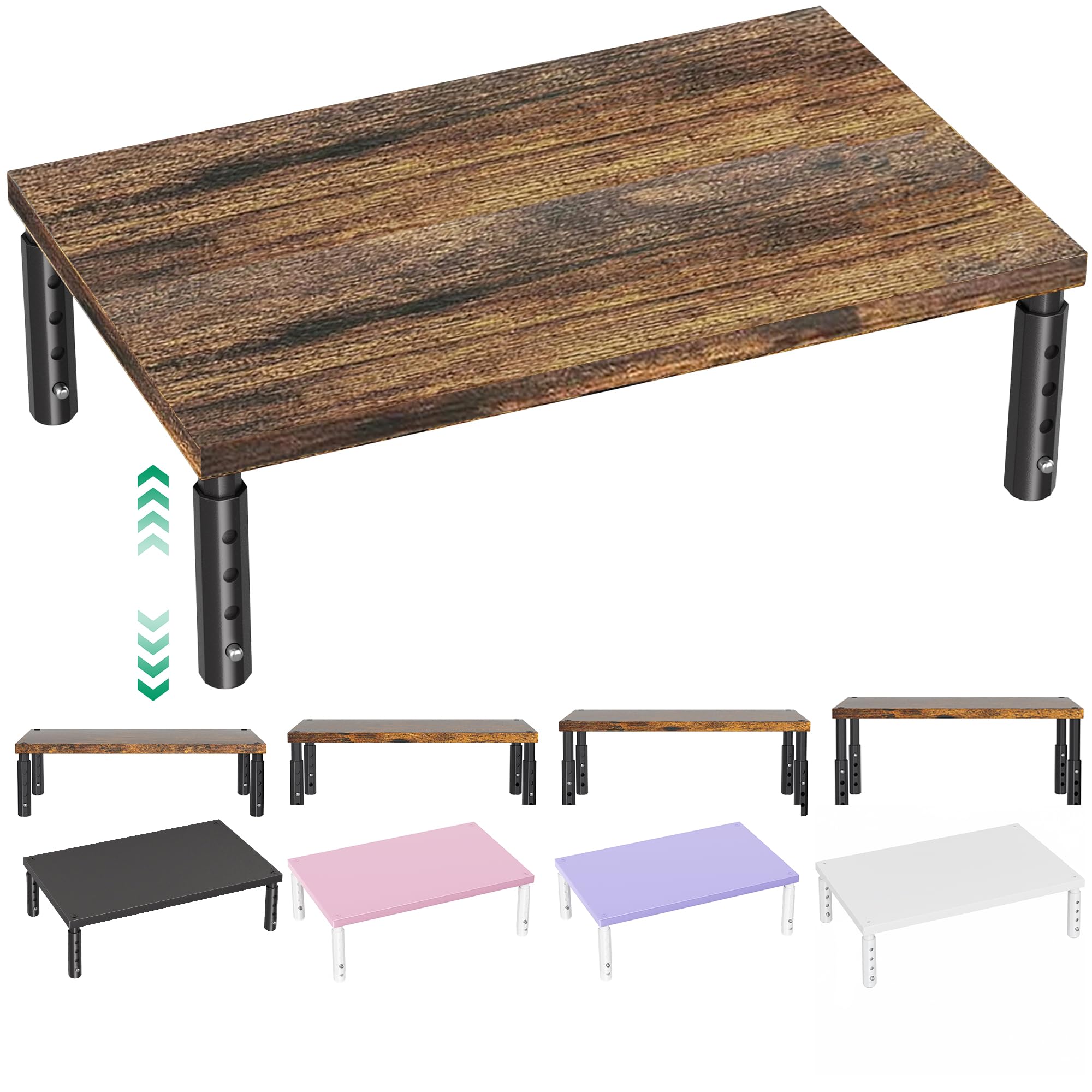
The OPNICE Adjustable Monitor Stand delivers four height settings up to 6.1 inches for an entry-level price, making it a practical choice for students and remote workers on a budget. The wood top uses a thin laminate rather than solid wood, so it won't match the look of premium stands, and the 44-pound capacity limits it to lightweight monitors. Assembly is quick with included hardware, and the stand feels stable for its price. Compared to similarly priced adjustable stands, the finish is noticeably less refined, which prevents it from competing with mid-range options.

Pros

  • Highly adjustable height with four settings
  • Extremely easy assembly with clear instructions
  • Great value for the price

Cons

  • Thin laminate top lacks the feel of solid wood
  • 44 lb load capacity leaves little margin for monitors near 40 lbs
Our verdict

This stand suits budget-conscious users who need height adjustability and have a light monitor – consider upgrading if a solid wood finish matters.

Check Latest Price

How to Choose

Material: MDF vs. Solid Bamboo vs. Acacia

MDF (medium-density fiberboard) is the most common material in budget stands. It is heavy, dense, and takes paint well, but it requires internal reinforcement (like a steel bar) to resist sagging over longer spans. Without that reinforcement, a 30-inch MDF stand will begin to bow under 30+ lbs within months.

Solid bamboo is naturally stronger and more stable than MDF of the same thickness. It also resists moisture better and has a warmer grain. The trade-off is price — a solid bamboo stand costs roughly double a comparable MDF unit. Acacia wood offers a premium look but has been found on some models with a fiberglass coating that poses a health risk — check the product description carefully before buying.

Load Capacity

Load capacity numbers on product pages are often the breaking point, not the safe working limit. For a single monitor stand, a 44-lb rating is adequate for most 27-inch monitors (15-20 lbs). For a dual monitor stand spanning 35+ inches, even a 100-lb rating can fail if the stand is not reinforced underneath.

A safer rule: take the listed capacity and cut it in half for dual stands, especially those without a center support leg. If you are placing two 30-inch monitors (25-30 lbs each), look for a stand rated at least 130 lbs overall with a steel frame or multiple legs.

Height

Most monitor stands come in heights between 3 and 6 inches. The ideal ergonomic height places the top of your monitor screen at or slightly below eye level when seated. For a typical desk height of 29 inches, a 4-to-5-inch riser is suitable for most users.

A stand that is too low (under 3.5 inches) may not clear a keyboard or provide enough neck relief. A stand that is too tall (over 6 inches) can make the monitor feel towering and require upward head tilt. Adjustable-height models give flexibility if you share the desk or alternate between sitting and standing.

Storage Features

Drawers, side caddies, and phone slots increase desk organization but add weight and complexity. A drawer on a budget stand may have rough glides or stick over time. If drawer wobble bothers you, consider a stand with a simple open shelf instead.

Cable management holes are more useful than they appear — they keep cords from tangling and reduce visual clutter. However, if your power adapters are large, check that the hole diameter is at least 1.5 inches.

Assembly Required vs. Pre-assembled

Pre-assembled stands (like the Homerays Bamboo) save time and avoid alignment issues, but they arrive in a larger box and may be more prone to shipping damage. Assembly-required stands often have a metal frame that gives better long-term support because you tighten every joint yourself.

The real hidden cost is not the 10 minutes of assembly but the risk of stripped screw holes on budget models. If you choose an assembly-required stand, use the included screwdriver gently — hand-tighten until snug, then stop.

Frequently Asked Questions